
Documents
Signed documents on your own instance
Deploy DocuSeal with managed Postgres and a public HTTPS URL. You own the documents. You pay for compute — not per signature.
TemplatesDocuSeal
What you get
A private DocuSeal, packaged to ship
Templates and signed PDFs on your instance — Postgres, a data volume, and the public URL are wired at deploy.
Templates and signing
Build a document, send it, and collect signatures. The audit trail stays on this instance.
First account on the URL
Open the hostname and create the account. That user owns the workspace.
Public HTTPS URL
Signers open the https://…stackblaze.app hostname. Use a custom domain when the link should be yours.
Dedicated instance
Contracts and signer data stay on this instance — not in a shared vendor account.
Managed Postgres
Submissions and templates live in CloudNativePG. Files persist on the /data volume.
Your documents
Fields, roles, and completed PDFs are configured on this instance.
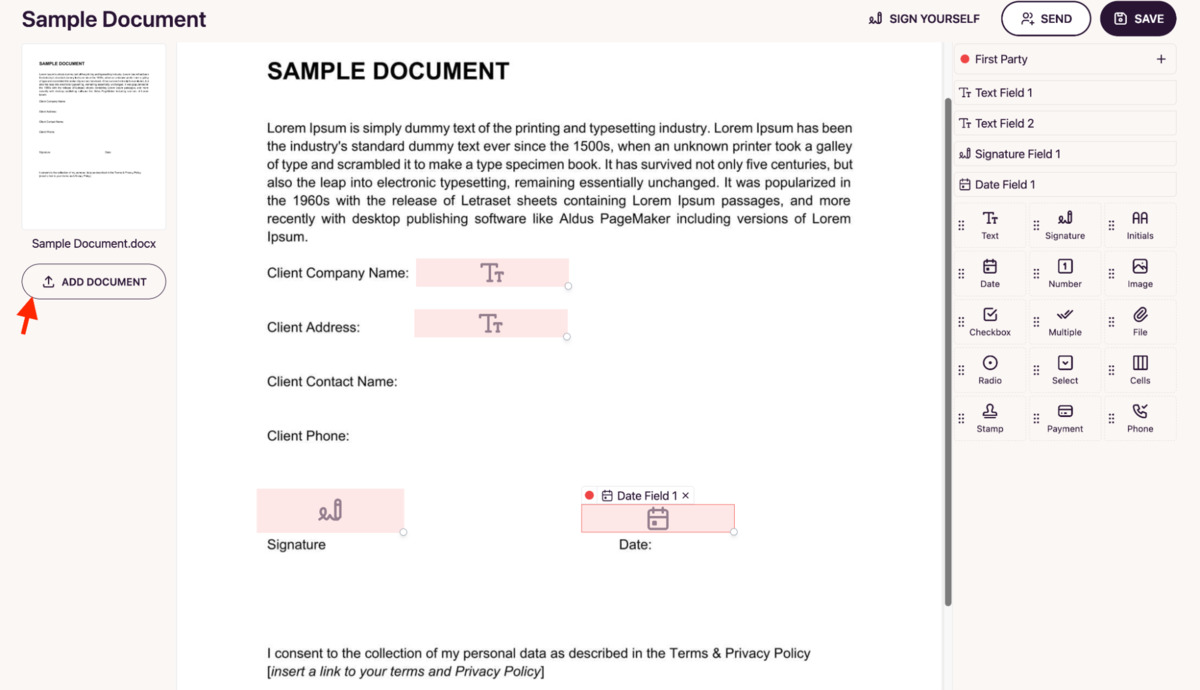
See DocuSeal in action
Deploy in seconds
One click. Postgres pre-wired.
Pick the DocuSeal template. StackBlaze creates the app and Postgres, mounts /data, and gives you a hostname.
This stack
Web
DocuSeal server
PostgreSQL
managed database · TCP:5432
Tenant
managed other
platform SMTP when the pipeline has mail
- Stack
- DocuSeal + PostgreSQL
- First login
- Create the first account on the public URL
- Files
- Signed documents persist on /data
After you deploy
- 1
Open the public URL
The hostname is on the app page after deploy.
- 2
Create the first account
Sign up on that page. That account owns the workspace until you invite others.
- 3
Send a document
Upload a PDF, place the fields, and send the link. Signers use this hostname.
Running DocuSeal on StackBlaze
How the instance is wired
DocuSeal and Postgres ship together. The public hostname is the app and the link signers open.
Postgres holds the submissions
Templates, signers, and status live in the attached database. Restart the app and the workspace is still there.
PDFs sit on /data
Uploaded and completed files persist on the volume. The database is not a file store.
Signers need the public URL
The link in the email is this hostname. Attach a custom domain from the dashboard when that link should use your domain.
Back up both stores
Back up Postgres and the /data volume if the signed documents matter.
Compare
DocuSeal on StackBlaze vs hosted e-sign
| Feature | DocuSeal on StackBlaze | Hosted e-sign |
|---|---|---|
| Data location | Documents and signatures live on your StackBlaze instance. | Contracts live in vendor-operated infrastructure. |
| Install model | One-click template. First account on the public URL. | Create a vendor account and use their shared platform. |
| Signing links | Your hostname, or a custom domain you attach. | The vendor’s domain and branding. |
| Operations | You control updates, scale, backups, and the instance lifecycle. | The vendor operates the platform and the limits. |
| Billing | Compute, storage, and bandwidth. No per-signature fee. | Usually priced per envelope or per seat. |
This template is DocuSeal plus Postgres. The first account is created on the public URL.
FAQ
Common questions
Open the public URL and create an account. That user owns the workspace. There is no pre-seeded password.
Ready to deploy DocuSeal?
One click. Dependencies pre-wired. No infrastructure to manage.